








































How Remote Camping Challenges Our Understanding of Connectivity, Safety, and Digital Independence

Camping is often associated with escaping crowded cities, disconnecting from daily routines, and spending time in places where nature takes priority over technology. Yet even a short outdoor trip can reveal how much modern life depends on internet access. Travelers use digital maps to locate trails, weather applications to monitor changing conditions, messaging services to coordinate with companions, and online resources to identify nearby facilities. Understanding how to have wifi anywhere becomes particularly valuable when an outdoor adventure takes people away from familiar roads, established infrastructure, and dependable home connections.
The challenge is not simply finding a network. A connection that works perfectly at a campsite entrance may become unreliable near a wooded trail, behind a rocky ridge, or inside a recreational vehicle surrounded by dense vegetation. Outdoor environments introduce variables that ordinary internet users rarely consider, including terrain, distance from cell towers, battery availability, and changing weather. These conditions make connectivity planning a practical part of preparing for a trip rather than something that should be left until arrival.
A thoughtful approach to portable wifi for camping involves understanding what technology can realistically provide and where its limitations begin. A dedicated hotspot may help campers share a connection between phones, tablets, and laptops, but it still depends on compatible network coverage unless the equipment supports another communication method. By examining connectivity alongside navigation, energy management, safety, and outdoor routines, campers can build a setup that supports their adventure without allowing technology to dominate it.
The Geography of Internet Access Beyond Established Campgrounds
Mobile connectivity is closely connected to geography. Cellular signals travel through an environment containing hills, trees, buildings, and other obstacles that can influence reception. A campsite situated near a populated road may have reasonable coverage, while a location only a short distance away can experience noticeably weaker service. This difference explains why checking a general coverage map is useful but cannot guarantee a consistent connection at every point along an outdoor route.
Forests and mountainous landscapes present particularly interesting challenges. Dense vegetation, changes in elevation, and the physical position of a campsite can affect how well a device receives a signal. Even when a phone displays network coverage, actual performance may be insufficient for video calls or large file transfers. Messaging and basic browsing might work acceptably under the same conditions, which means campers should distinguish between having a signal and having enough bandwidth for their intended activities.
The best preparation begins before departure. Travelers can investigate coverage around their campsite, identify the nearest established facilities, and check whether their accommodation provider offers reliable internet access. They should also download maps, reservation details, and other essential information while a strong connection is available. These preparations reduce dependence on live internet access and make it easier to continue a trip when the environment does not cooperate.
Why a Dedicated Hotspot Can Change the Camping Experience
Using a smartphone as a hotspot is convenient for occasional internet sharing, but prolonged tethering can drain its battery while the phone is also being used for photographs, navigation, and communication. This creates a practical conflict: the same device providing internet access may also be the primary tool needed to navigate unfamiliar surroundings or contact other people. A separate hotspot can reduce this dependence by handling internet sharing while leaving the phone available for other tasks.
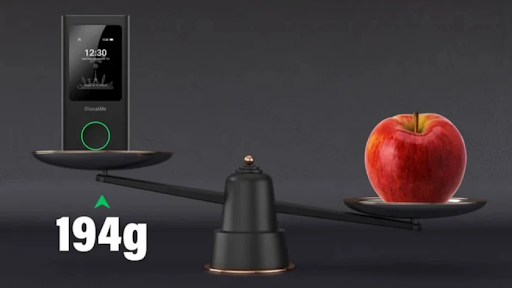
A dedicated device can also simplify connectivity for groups. Families may want to connect several smartphones, while campers working remotely might need access for a laptop and tablet. Depending on the model, a portable hotspot can create one shared wireless network for multiple compatible devices. Before purchasing equipment, however, users should confirm the supported device count, battery performance, network compatibility, data package, and availability of service at their destination.
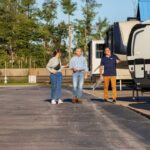
The value of a hotspot becomes clearer when the campsite serves as a temporary workspace or base for a longer journey. Someone staying in an RV for several nights may need to check work messages, upload documents, or communicate with clients. A family might use the same connection to organize activities and share travel information. In both cases, a dedicated internet device can provide greater flexibility, although actual performance still depends on network conditions and the equipment being used.
How to Have WiFi Anywhere Without Depending on a Single Technology
Reliable outdoor connectivity rarely comes from one universal solution. Different internet methods serve different situations, and understanding those differences allows campers to make better decisions. International travelers may consider roaming, local SIM cards, or eSIM plans, while people taking regular domestic trips might prefer a compatible mobile hotspot and an appropriate data package. Public Wi-Fi can be useful near visitor centers or accommodation facilities, but it should not be treated as a guaranteed resource throughout an outdoor journey.
The practical question behind how to have wifi anywhere is how to match a connection method to the actual environment. Someone camping at an established site with cellular coverage may only need a conventional portable hotspot. A person traveling between several regions may benefit from a device or plan that supports multiple network operators. Those exploring areas with little or no cellular service may need offline navigation and, depending on the risk level, a separate satellite communication device.
Network flexibility can be valuable when traveling through areas served by different operators. Some portable hotspots use technologies such as CloudSIM to access supported mobile networks without requiring users to manage a conventional physical SIM card for every connection. Certain devices can select among available networks according to their capabilities and local conditions. This can improve flexibility, but it does not create coverage where no compatible network is available. Campers should verify which countries, regions, operators, and data plans their chosen service actually supports.
Battery Management Is Part of Connectivity Planning
An internet device is useful only while it has enough power to operate. Camping can make charging difficult because visitors may spend long periods away from vehicles, electrical outlets, or established facilities. A hotspot with impressive connectivity features may still be unsuitable for a particular trip if its battery cannot support the expected hours of use. Battery capacity, real-world operating time, charging requirements, and the availability of backup power therefore deserve attention before departure.
Power consumption also depends on how the device is used. Connecting several devices, maintaining a weak cellular signal, or performing demanding online activities can affect battery performance. Campers can reduce unnecessary consumption by disconnecting devices that are not being used, limiting background synchronization, and switching off the hotspot when it is no longer needed. Checking the manufacturer’s battery specifications is more useful than relying on a single advertised figure without considering actual conditions.
A power bank can provide a convenient backup, provided it is compatible with the equipment and has sufficient capacity for the intended trip. RV travelers may also have access to vehicle power or a suitable solar charging arrangement. However, charging equipment should be protected from moisture, excessive heat, and physical damage. Keeping electronic equipment dry and storing it securely helps prevent a minor power problem from becoming a larger disruption during the trip.
Portable WiFi for Camping and the Importance of Emergency Preparedness
Internet access can support outdoor safety by helping people check weather forecasts, communicate changes in their plans, and find information about local facilities. Campers can use online maps to understand their surroundings and review official alerts before beginning a hike. When conditions change, access to current information may help them decide whether to continue an activity, return to camp, or seek assistance. These benefits make connectivity useful, but they should never be confused with a guarantee of emergency communication.
A portable wifi for camping setup should be selected with the limits of cellular networks in mind. A mobile hotspot generally relies on available compatible cellular service. If a campsite sits in a complete dead zone, switching from a smartphone to a portable hotspot may not solve the problem. Travelers heading into remote wilderness should consider whether their route requires a satellite messenger, satellite phone, or another suitable emergency communication device, and should learn how that equipment works before leaving.
Preparation also means sharing an itinerary with someone who is not joining the trip. Campers can communicate their planned route, expected return time, and arrangements for checking in. They should know the relevant local emergency procedures and carry appropriate navigation equipment. A charged phone and hotspot are useful additions, but neither replaces basic outdoor safety practices, suitable equipment, or a clear plan for responding to unexpected situations.
Managing Data Usage When Connectivity Is Limited
Camping often involves a different pattern of internet use from everyday life. A person may check a map several times, send photographs, attend a work meeting, and stream entertainment after returning to the campsite. These activities can consume very different amounts of data. Without monitoring usage, a limited plan may run out earlier than expected, particularly when several people share the same connection.
The easiest way to control consumption is to separate essential tasks from optional activities. Downloading maps, travel documents, playlists, and other resources before leaving home reduces the need to retrieve them through mobile data. Automatic application updates and cloud backups can be restricted until a suitable connection becomes available. Campers who need to work online can also schedule large uploads and downloads when network conditions are stronger and their data allowance permits it.
Group camping requires a little more coordination. A hotspot may support several devices, but that does not mean every connected device should stream high-definition video or download large files continuously. Agreeing on basic usage expectations can help preserve data for navigation, communication, and other important tasks. Checking the remaining allowance each day also provides an opportunity to adjust habits before the connection becomes unavailable.
Creating a Campsite Setup That Works With Nature
A campsite’s physical layout can influence the quality of an internet connection. A hotspot placed deep inside a vehicle or behind several obstacles may receive a weaker signal than one positioned closer to a suitable opening. Campers can test reception at different safe locations around their campsite, following the device manufacturer’s instructions and keeping equipment protected from weather. Small adjustments may help, although the improvement depends on local network conditions.
Placement should never compromise safety or damage the surrounding environment. Devices should not be left exposed to rain, direct sunlight, extreme temperatures, or locations where they could be knocked over. Campers should also avoid leaving valuable equipment unattended in public areas. A secure, shaded, and reasonably elevated position may be worth testing when it is practical and permitted at the site.
It is equally important to recognize when connectivity should not be the priority. A camping trip can offer an opportunity to spend time outdoors without constant notifications. Establishing specific periods for checking messages, reviewing weather conditions, or handling work tasks can preserve the benefits of being connected while leaving enough room to enjoy the natural setting. Technology works best when it supports the purpose of the trip instead of dictating every activity.
Choosing Equipment Based on the Type of Adventure
A weekend at an established campground has different requirements from a week-long expedition through remote terrain. Casual campers may prioritize portability, straightforward setup, and enough battery capacity for occasional browsing. Families may focus on sharing a connection across several devices. Remote workers might need stronger network flexibility, a suitable data allowance, and enough power to support regular online tasks.
Before choosing equipment, consider the following practical questions:
- Where will the device be used? Check coverage for the actual destination rather than assuming that all outdoor areas have reliable cellular service.
- How many devices need internet access? Confirm the hotspot’s supported device limit and consider how simultaneous use affects performance.
- How long will the trip last? Compare realistic battery life with the availability of charging options.
- What activities require internet access? Basic messaging and map updates have different data requirements from video calls and streaming.
- What happens if the network disappears? Keep essential resources offline and consider separate emergency communication equipment for remote trips.
These considerations help narrow the available options without paying for features that may not be needed. A more advanced device is not automatically the best choice for every camper. The right equipment is the one that fits the destination, usage pattern, budget, and level of preparedness required for the journey.
Final Thoughts
Outdoor connectivity is best understood as a combination of technology, preparation, and realistic expectations. A portable hotspot can make it easier to share internet access, manage travel arrangements, and remain in contact with others, but its performance depends on compatible network coverage, power availability, and the surrounding environment. Offline maps, saved documents, sensible data management, and emergency planning remain essential parts of a dependable setup.
For anyone evaluating portable wifi for camping, the most important step is to start with the realities of the planned trip rather than the promise of being connected everywhere. Check coverage, understand the device’s limitations, and prepare alternatives for situations where mobile networks are unavailable. Combining these measures with a suitable approach to how to have wifi anywhere can make camping more flexible and convenient without creating a false sense of security.
Frequently Asked Questions
Does portable Wi-Fi work at every campsite?
No. A conventional mobile hotspot needs a compatible cellular network, and reception can vary with terrain, vegetation, distance from towers, and local network conditions. Check coverage before departure and prepare offline alternatives.
Is a portable hotspot better than using a phone for camping?
A dedicated hotspot can keep internet sharing separate from a phone used for navigation, photography, and calls. It may also support several devices, depending on the model. The better choice depends on coverage, battery requirements, data costs, and the number of connected devices.
How much data is enough for a weekend camping trip?
The amount depends on usage. Messaging, email, and occasional map updates may require relatively little data, while video calls, photo uploads, and streaming can consume considerably more. Downloading essential resources beforehand and monitoring usage can help keep a limited plan available for important tasks.
Can portable Wi-Fi replace satellite communication in remote wilderness?
No. A standard cellular hotspot cannot provide service when compatible mobile networks are unavailable. In areas where emergency communication is a concern, campers should consider suitable satellite communication equipment and understand its operating requirements before setting out.
What should I download before leaving for a camping trip?
Useful offline resources include navigation maps, campsite directions, booking confirmations, emergency contact details, trail information, and any documents needed during the journey. Weather forecasts should also be checked before departure, with a plan for receiving updates when connectivity is available.
How can I conserve hotspot battery power outdoors?
Disconnect unused devices, limit unnecessary background activity, switch off the hotspot when it is not needed, and carry a compatible power bank if appropriate. Protect both the hotspot and its charging equipment from moisture, excessive heat, and physical damage.
